

In the fast-paced world of digital marketing and e-commerce, standing still is the same as moving backward. As a PPC and marketing specialist who has managed campaigns across Google, Facebook, and Sklik for over a decade, I know that content is the fuel that powers the engine of sales. Whether it’s a high-converting landing page, a product description for your e-shop, or an SEO-driven blog post, the quality and speed of your content determine your ROI.
Today, we are announcing a massive leap forward for wpbase.eu. We have updated our flagship plugin, the Athéna AI Content Assistant, to support the absolute cutting-edge in artificial intelligence: Google Gemini 3 Pro (Preview).
If you are looking for the ultimate AI plugin for WordPress, your search ends here. Let’s dive into why this update changes the game for site owners, SEO specialists, and e-commerce managers.
Great News: Gemini 3 Pro is Now Inside Your Dashboard
For a long time, the debate in the AI community was strictly focused on OpenAI. But the landscape has shifted. Google has aggressively iterated on its models, and with the release of Gemini 3 Pro, they haven’t just caught up; in many specific use cases—especially reasoning and long-context understanding—they have taken the lead.
We believe that our users deserve the best tools available on the market. That is why we worked around the clock to integrate the API for Gemini 3 Pro (Preview) directly into the Athéna infrastructure.
You no longer need to switch tabs between your WordPress editor and an external chat window. You don’t need to copy-paste prompts. You now have the raw power of Google’s most advanced model right inside your CMS, ready to generate, optimize, and polish your content.
What Does Gemini 3 Pro Bring to the Table?
You might be asking, “Why should I switch to Gemini for WordPress if I’m already using GPT-4 or Claude (Support for Claude will be available in the AI Assistant soon)?” It’s a valid question. In the world of PPC and SEO, we optimize for data, not hype. Here is why Gemini 3 Pro is a necessary addition to your toolkit:
1. Superior Reasoning and Nuance
Gemini 3 Pro represents a significant jump in “reasoning” capabilities. For e-commerce store owners, this means the AI understands intent better. It doesn’t just describe a product; it understands why a customer would buy it. It writes persuasive copy that sounds less robotic and more like a seasoned copywriter.
2. Speed and Efficiency
In our internal testing at wpbase.eu, Gemini 3 Pro demonstrated remarkable latency improvements. When you are bulk-generating product descriptions for a WooCommerce store with 5,000 items, every second counts. Gemini 3 delivers high-fidelity text faster than many of its competitors, streamlining your workflow.
3. SEO-Native Understanding
Google built Gemini. It stands to reason that the model has an intrinsic understanding of how to structure information in a way that Google Search “likes.” While no AI guarantees rankings, using a Google-native model to structure your headings, semantic keywords, and featured snippets aligns perfectly with modern SEO best practices.
How to Set Up Gemini 3 Pro in Athéna AI plugin
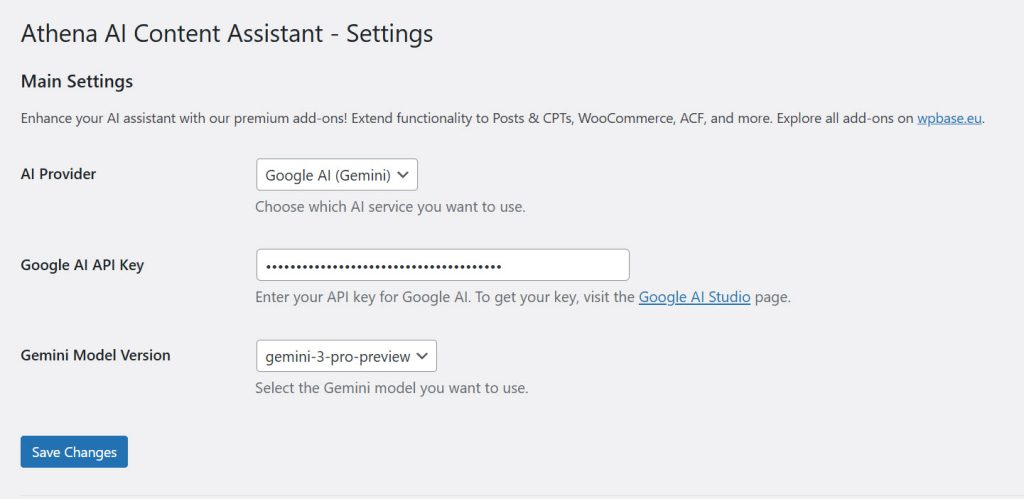
We have kept the interface incredibly user-friendly. We know that as a business owner, you want to spend time selling, not configuring software.
Here is the step-by-step guide to activating Gemini for WordPress in your Athéna plugin:
-
Update the Plugin: Ensure you have the latest version of Athéna AI Content Assistant installed on your WordPress site.
-
Navigate to Settings: Go to your WordPress Dashboard sidebar, find “Athéna AI”.
-
Select AI Provider: In the “General” or “API Settings” tab, locate the AI Provider dropdown menu. Change this to Google AI (Gemini).
-
Choose the Model: A secondary dropdown will appear. Select Gemini 3 Pro (Preview) from the list.
-
Save Changes: Click the “Save Settings” button at the bottom of the page.
Don’t Have a Google API Key? Here is How to Get One
To bridge the connection between your WordPress site and Google’s brain, you need an API key. If you haven’t used Google’s AI models before, don’t worry—it is free to start and easy to generate.
-
Visit Google AI Studio: Go to aistudio.google.com.
-
Sign In: Log in with your standard Google account.
-
Create API Key: On the left sidebar, click on “Get API key.”
-
Create Key in New Project: Click the button to generate a key.
-
Copy and Paste: Copy the long string of characters. Go back to your Athéna plugin settings in WordPress, paste it into the Google API Key field, and hit Save.
Note: Google offers a generous free tier for the Gemini API, which is more than sufficient for most bloggers and small to medium e-commerce stores.
Why Athéna AI Content Assistant is the Best AI Plugin for WordPress
In a market flooded with generic AI wrappers, Athéna AI stands out as a professional-grade tool designed for serious publishers and e-commerce managers. Here is why it is the superior choice for your business:
1. “Bring Your Own Key” (BYOK) = Unbeatable Cost Efficiency
Most AI plugins charge you a monthly subscription (often $20–$50/month) just to access the AI. Athéna operates differently. You connect directly to Google or OpenAI using your own API key.
-
The Result: You pay only for what you use, at wholesale prices. For example, with the efficient
GPT-4o-minior Google’s Flash models, you could generate hundreds of articles for less than $1. No hidden markups, no monthly limits.
2. Deep Integration (WooCommerce & ACF)
Athéna isn’t just a chatbot in a sidebar; it deeply understands your WordPress structure.
-
Don’t write product descriptions by hand – it takes an average of 20-30 minutes / one product. With the AI assistant, you will have a product description ready in a minute.,
-
For Developers: The ACF (Advanced Custom Fields) Expander is a game-changer. Athéna can read and write into complex custom fields, ensuring your content fits your site’s specific design, not just the main body text.
3. Context-Aware Content Creation
Generic AI tools write blindly. Athéna allows you to define the context. Whether you need to rewrite a specific paragraph, summarize an entire page, or generate SEO meta descriptions based on your content, the plugin sends the right data to the AI. This means the output is highly relevant, minimizing the need for edits.
4. Model Agnostic Flexibility
Don’t get locked into one ecosystem. Athéna gives you the freedom to switch between Google Gemini (ideal for creative reasoning and large context) and OpenAI’s GPT (perfect for structured data) instantly. You always have access to the best model for the specific task at hand.
5. Built for Safety: Version History
We know the pain of losing a great AI generation. Athéna automatically saves every version of the text it generates. With one click, you can compare iterations or restore a previous version. It’s a safety net that lets you experiment fearlessly.
Ready to Upgrade Your Workflow?
The integration is live right now.
-
Existing Users: Update your plugin and switch to Gemini 3 Pro today.
-
New Users: Don’t let your competitors outpace you with better content.
Get Athéna AI Content Assistant Now – for FREE
Also check out premium add-on plugins that extend the functionality of the Athéna AI plugin.
The future of WordPress is intelligent. Make sure your website is ready.